Notebook
This is the manual. Every tool it describes runs in your browser, free, no account.
Open the workbench| Document kind | notebook |
| Drawn from | a tool result — there is no file behind it |
What it draws
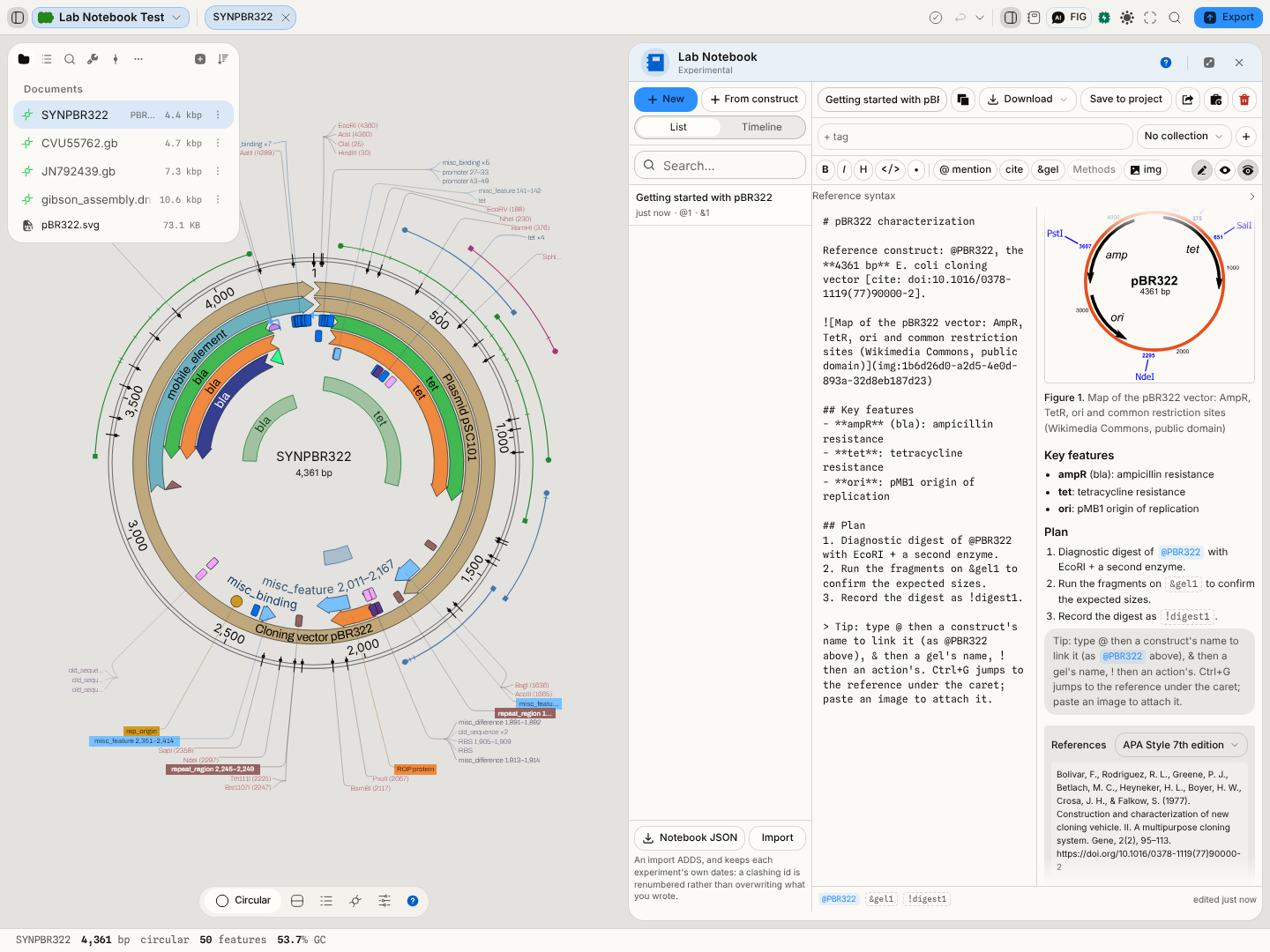
An electronic lab notebook: a list of experiments on one side and the open experiment on the other. An experiment has a title, tags, and a body written in markdown, and it is yours.
The body can be read in three ways: as source while you write it, as the rendered document, or as a split of both. In the rendered document, references are chips you can follow, figures carry their numbers and captions, and citations are set in the style you chose with the bibliography beneath.
What opens in it
Experiments you create, write, or ask the assistant to write. Notebook entries are written in the app and leave it as Markdown, Word or PDF, which is what makes an entry readable in ten years by something that is not this application.
What this computes
No number you type is computed, checked or rewritten for you. A number in a run cell comes from the analysis the cell runs, and the notebook keeps it honest. Beyond that, the notebook computes everything that turns a body into a document:
-
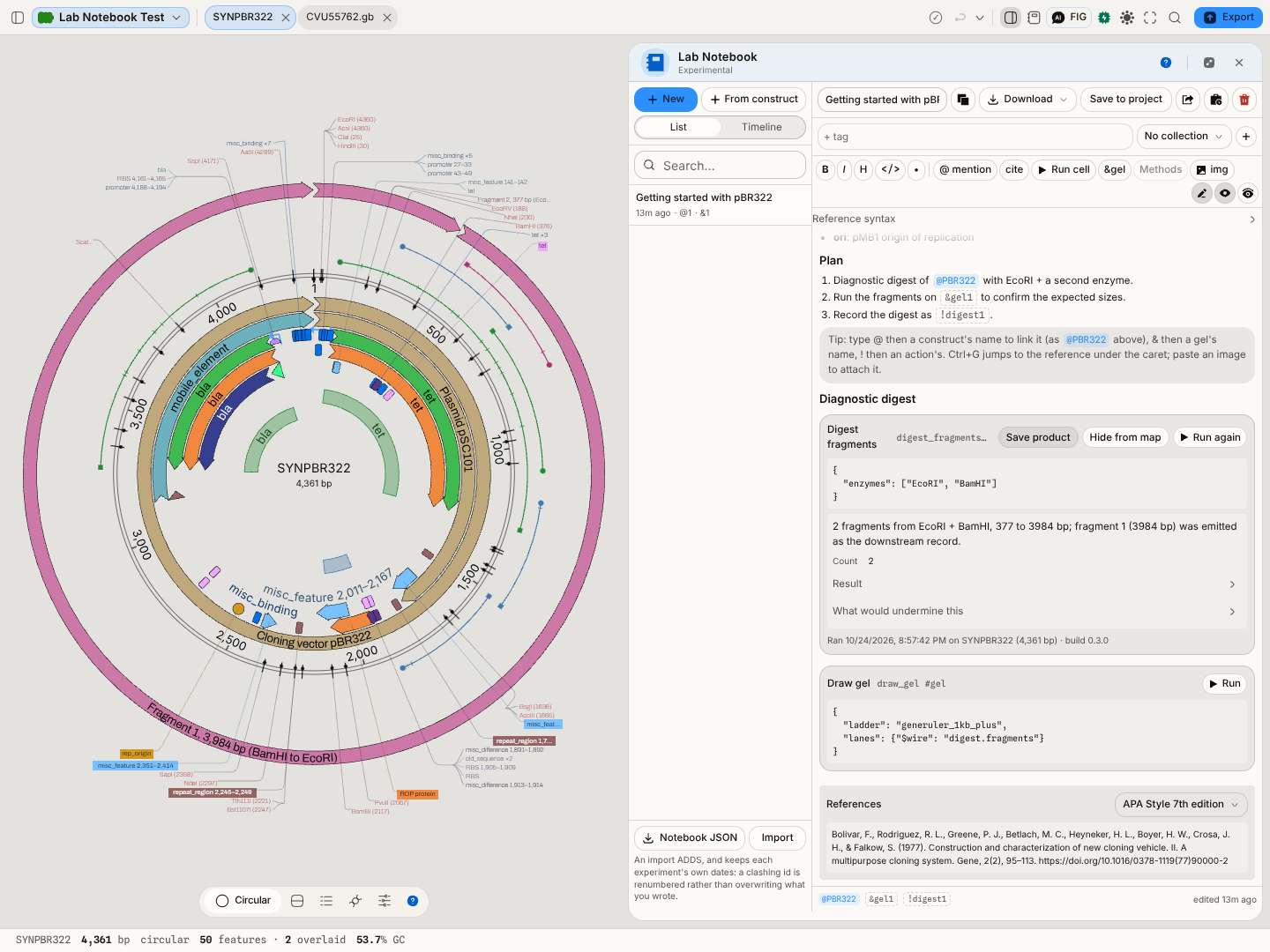
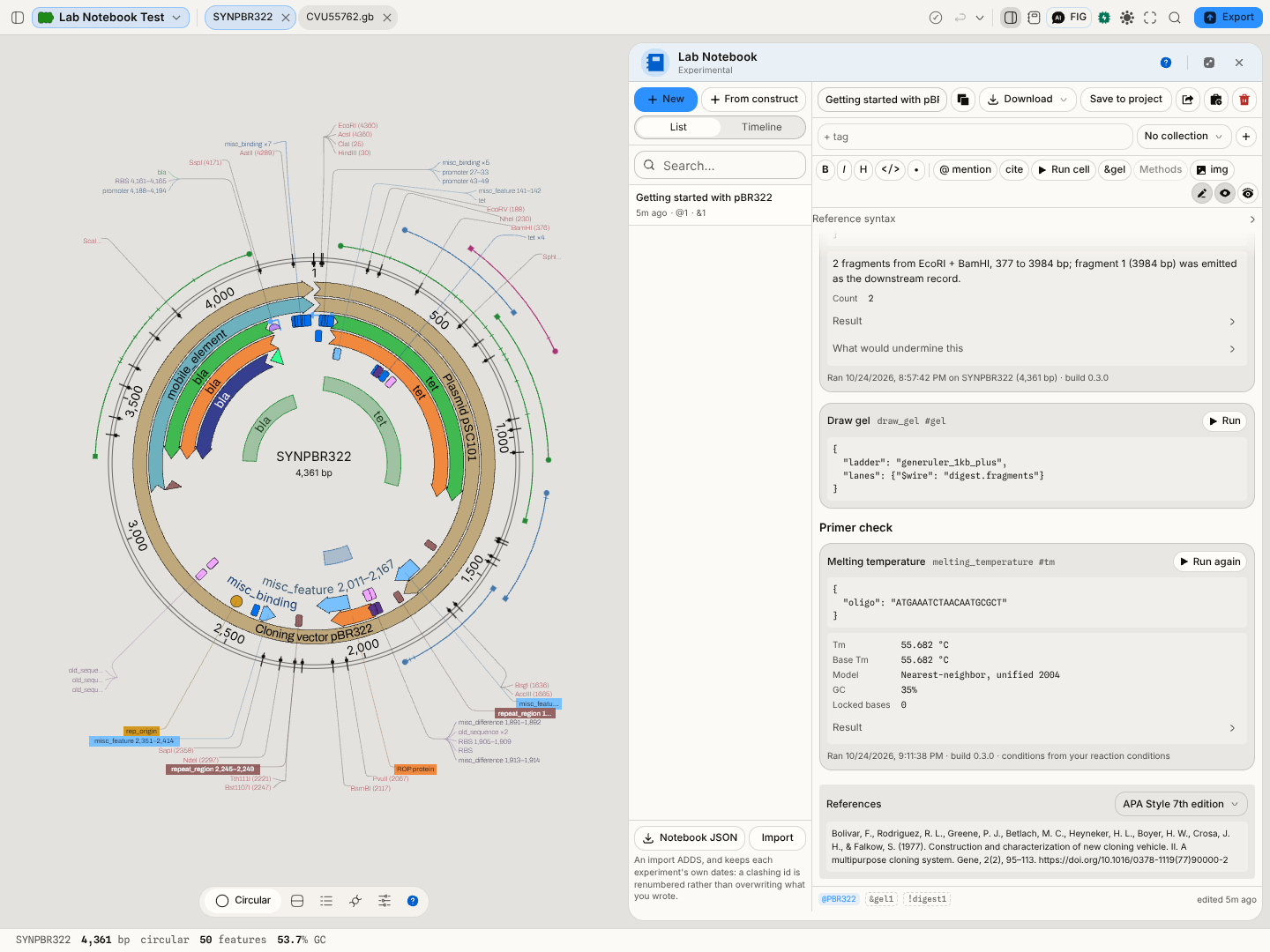
Run cells. A cell names one analysis (a digest, a melting temperature, an ORF search, a gel, any tool in the workbench) and its settings, and Run computes it on the record that is open, with the same validation, defaults and models as that tool's own panel. The result appears under the cell with the tool's conclusion, every value with its unit (55.682 °C, GC 35%), its figures and what would undermine it. Each result is pinned: the record it read (name, length, any selection), its settings, the build that computed it, and where each setting came from.
-
Staleness. A pinned result says when it no longer describes the note: its settings were edited since the run, the record it read is no longer the one open, the software changed, or a cell it takes input from ran again. It is never rerun or rewritten behind your back.
-
Cells that feed cells. A cell given a name (
#digest) can hand one of its outputs to a later cell (the fragments of a digest as the lanes of a gel), so a result travels between analyses without being retyped. Running a cell runs the cells it depends on first. A loop, a duplicate name or a name that does not exist is refused and named. -
Results on the map. A result that names positions on the record (cut sites, fragments, ORFs, primers, amplicons, CRISPR guides) can be drawn on the circular, linear and sequence views with Show on map, labelled with what each mark is. The marks are not saved into the record. Past the map's limit for notebook results, marks are drawn spread evenly and the cell says how many of how many.
-
Cross-reference resolution. References are extracted as you type from three sigils:
@for a construct, a file, a tab, a tool or another experiment;!for an action you performed;&for a bench artefact such as a gel. Each is resolved against what really exists. One that names nothing stays plain text rather than becoming a chip that goes nowhere. -
Figure numbering. A captioned image standing alone in its paragraph is a figure, the rule Pandoc and Quarto use. Figures are numbered in the order they appear, and the number is never stored: move a figure and every later one renumbers, in the preview and in every export alike.
-
Figure captions from the run. A figure added from a plot is captioned with the drawing's name, the tool that drew it and the conclusion that tool is showing at that moment. You edit it like any other text.
-
Citation formatting.
[cite: doi:…],pmid:andpmcid:keys are looked up at the registering authority (Crossref and DataCite for a DOI, NCBI for PubMed and PMC) and formatted by the Citation Style Language processor in the style you choose, numbered by first citation, with the bibliography built from the same records. -
A methods section from what was built. Methods writes one paragraph per construction step recorded in the open project: the product with its length and topology, the operation, its inputs, enzymes, oligos with the sequences they ran with, and every setting the run used, each marked as set by you, left at its default, or filled from the workspace. The method's paper is cited by DOI (Gibson et al. 2009 for isothermal assembly, Engler et al. 2008 for Golden Gate, Saiki et al. 1988 for PCR) and the simulation software is linked. A step whose settings were not recorded says so rather than borrowing the panel's current ones, which might describe a run that never happened.
-
Version history. Every change to an entry is a step in its history, whoever made it: your typing, the assistant, a figure added from a plot. Consecutive edits fold into one step.
Reading it
| Sigil | Refers to | Clicking it |
|---|---|---|
@ | a construct, file, tab, tool or experiment | opens it |
! | an action you performed | points at the recorded step |
& | a bench artefact, such as a gel | opens that bench surface |
A figure carries its number and caption under the picture: Figure 2., then the drawing's name, the tool in parentheses, and the conclusion the tool showed when the figure was taken. A citation reads in the chosen style, as a number or as author and year, and the paper appears under References.
A run cell shows the call as written, then its result, then one line of provenance (Ran … on pBR322 (4,361 bp) · build …). A note above the result says why it is stale, and which cell moved when an upstream cell ran again.
A warning above the body means a reading you pinned has moved: the tool it came from now concludes something different, or its settings changed after the run you pinned.
Controls
- Formatting and insert helpers act on the body as in any markdown editor; @ mention offers everything in the project, Cite inserts a citation key, img attaches an image from the project.
- Run cell inserts any analysis from a searchable list, its settings written out with their defaults so you can see what the run will use; edit them and press Run. Show on map draws the result's positions on the record; Save product saves a construct the analysis made into the project.
- Methods inserts the methods section for the open project's builds.
- Add to notebook appears on every plot's menu, in the Export panel for any tab (a drawing goes in as its own vector file; any other view as a picture of the tab), and beside the plasmid map's image export. The figure goes into the experiment you have open, or starts one named after it.
- Export writes the experiment as Markdown, Word or PDF, with numbered figures, tables, the formatted citations and the bibliography. Every run cell is followed by its pinned result: conclusion, values with units, figures, caveats and provenance, marked if stale. Vector figures stay vector in both. A figure whose image is gone is named in its place, and you are told.
- Version history lists the steps of the open experiment; Restore returns it to any of them.
- Save to project writes the experiment into the open project as a Markdown file; Share does that and opens the project's sharing, so the experiment travels with the project.
- Search in the experiment list narrows by title, body and tag; the project-wide search in the left rail finds experiments too, beside the files.
Where it appears
As a stage tab, and docked in the right rail beside whatever you are working on, which is the arrangement the notebook is really for: an entry is usually written while the thing it describes is on screen.
Performance and limits
The body is a text document and behaves like one: very long entries stay responsive, but a single entry holding hundreds of images is better split into several, since images load with the entry that owns them.
The notebook belongs to this browser rather than to a project; sharing an experiment means saving it into a project. Version history is kept in the same browser and is not locked or signed, so the notebook is a record you keep, not an audited instrument.
A run cell's input is the analysis's settings written out; a typing mistake is reported when you press Run, not as you type. An analysis that needs an online service needs the network for that cell. Results that name positions are drawn for six analyses today: restriction sites, ORFs, digest fragments, primers, PCR amplicons and CRISPR guides; the others show their positions in the cell's table.
A citation needs the network the first time it is looked up; after that the record travels with the notebook and formats offline.
Screenshots
Related
Any tool whose result you want to remember; the provenance surface, which records what was done where the notebook records why.